
Running LLMs in the Browser: A WebGPU + WebLLM Field Guide
What's the biggest opportunity for web designers after AI? Not AI-generated UI. It's building experiences that were genuinely impossible before — and that requires rethinking where the model lives.
What's the biggest opportunity for web designers now that AI is here?
Not Copilot writing your code. Not AI generating UI mockups. Something more fundamental: you can now build experiences that were genuinely impossible before.
The Mobile App Explosion vs. What AI Is Doing Now
Let's zoom out first.
When mobile apps arrived, the real disruption wasn't the app format itself — it was how content got distributed. Media consumption used to be mainstream-driven: you watched what Netflix put on the front page, listened to what labels pushed to radio. Mobile dropped the barrier to near zero. YouTube, TikTok, Suno, Sora — anyone could create content, and long-tail demand finally had a way to get served.
AI is doing the same thing, but to productivity tools:
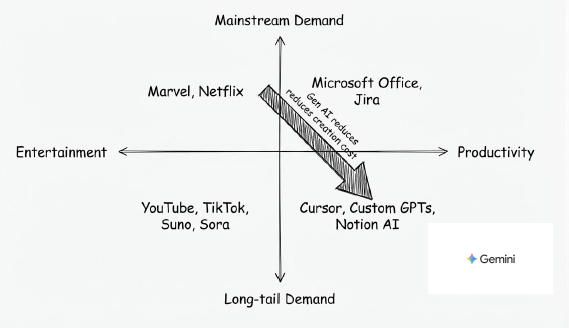
The top-left used to own everything: Microsoft Office, Jira — products designed on the premise of serving everyone with one tool. The result is that everyone uses something that's maybe 30% right for them. AI is causing the bottom-right to explode: Cursor, Custom GPTs, Notion AI — tools that can be deeply optimized for specific workflows.
That quadrant shift is where the opportunity is.
How might we build UI/UX that was impossible before?
Experiences That Didn't Exist Before
Concretely, what does "impossible before" actually look like?
A few directions:
- Inline reasoning inside workflows: Not a chat box on the side, but the interface responding meaningfully to what a user is doing mid-flow — filling out a form, navigating a process.
- Hyper-personalized interface logic: The same feature showing different guidance paths to different users, determined by a model rather than hardcoded rules.
- Offline-capable AI assistance: In environments with unreliable connectivity, AI features shouldn't be the first thing to disappear.
These scenarios share a common requirement: the model needs to be close to the user — low latency, controlled cost, high availability.
Which is where the current way of building AI runs into a wall.
The Five Problems with Third-Party APIs
Most AI features today are built by calling a third-party API. That's fast to ship, but when you seriously try to build any of the experiences above, you hit five problems:
- Who pays for the tokens: Does the cost go into your COGS, or do you pass it to users? There's no clean answer, and it's hard to control.
- Latency: Every interaction requires a full round-trip. If you want truly real-time experiences, this lag is a blocker.
- Network dependency: No internet, no AI. In many real scenarios, this isn't an edge case.
- Rate limits: Scale up and you start getting 429s. You have almost no control over this.
- Developer experience: How do you mock a streaming AI response? Every dev iteration means hitting a real API — slow and expensive.
The common root of all five: the model isn't on your side.
WebLLM: The Model Lives in the Browser
WebLLM is an open-source library from MLC AI that runs language models directly in the browser — no backend required. It combines two technologies:
- WebGPU: Direct browser access to the GPU, enabling matrix operations to run on the user's graphics hardware.
- WebAssembly: Handles CPU-side sequential logic, covering what GPU isn't suited for.
On first load, the model downloads to Cache Storage. Every subsequent visit reads from local. Performance is roughly 20% slower than native execution — acceptable for interactive use cases. Memory footprint is typically under 1GB.
The API mirrors OpenAI's: streaming, structured JSON output, and tool calling all work. If you've written code that calls ChatGPT, migration cost is low.
From Fine-Tuning to Browser: Three Steps
When you need to customize a model for a specific task:
1. Fine-tune
Use Unsloth with LoRA (Low-Rank Adaptation). LoRA doesn't retrain the full model — it adds small low-rank adapters to specific layers, dramatically reducing training cost.
2. Quantize
Use MLC-LLM to compress from float32 to float16 or int8. You get down to ~1GB with limited performance loss.
3. Configure for deployment
Point WebLLM at your model location, model ID, and architecture config — that's it.
Two Real Use Cases
MBTI Survey Assistant
Survey questions are often ambiguous. Users get partway through and aren't sure what a question is actually asking. Put a small model on the page and let users ask "what does this question mean?" — no page navigation, no external API call, no token cost.
AI Town Multi-Agent Simulation
A continuous simulation with multiple interacting agents. If every agent step requires an external API call, cost and latency make it unworkable. Move the model into the browser and the simulation can run indefinitely at near-zero cost.
Small Models Are Getting Capable
This whole direction depends on one premise: the capability ceiling for small models is rising fast.
1B–3B parameter models are now competitive with earlier generations of much larger models on specific tasks. Combine that with fine-tuning for your specific use case, and "small but sufficient" is increasingly viable.
Browser-side AI isn't a replacement for cloud inference. It's an invitation to ask a more precise question: which interactions actually need to make a round-trip to a server? The ones that need to feel immediate, that need to work offline, that shouldn't cost you a token every time a user types — maybe those were never a good fit for remote APIs in the first place.